Summary
- Loader masquerades as ts3client_win64.exe to impersonate the TeamSpeak 3 client, any instance outside C:\Program Files\TeamSpeak 3 Client\ is the Skript.gg loader.
- C2 domain skript.gg observed in DNS cache, LSASS memory and browser history simultaneously.
- DiagTrack service entries and a ts3client_win64 DLL artifact in Explorer provide additional persistent indicators.
- Deleted cheat files are recoverable from unallocated disk space using Disk Drill, confirming prior installation even after manual deletion.
Overview
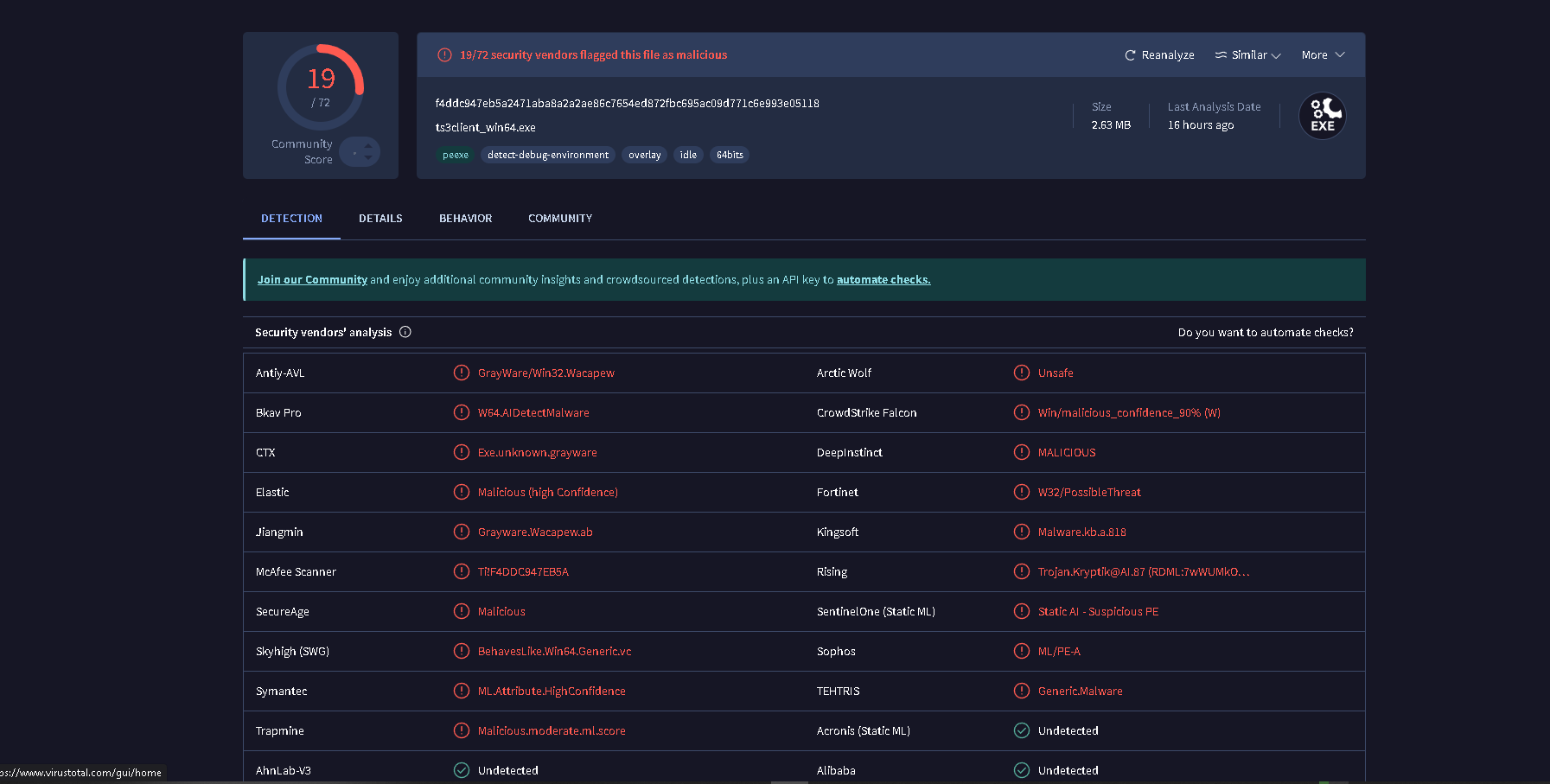
Skript.gg is a commercially distributed FiveM cheat. Its loader is named ts3client_win64.exe, the same filename as the TeamSpeak 3 64-bit client, to impersonate the voice communication software and avoid casual process-list detection. The binary is approximately 1.9 MB and communicates with skript.gg for license validation and payload delivery. Some variants are also known to use the name of USBDeview, a legitimate USB enumeration utility.
Skript.gg leaves a broader artifact set than most FiveM cheats documented in this corpus. In addition to the standard DNS cache and DPS timestamp indicators, it generates DiagTrack service entries, places a DLL artifact visible in Explorer, and leaves strings in LSASS memory during an active session. Even after manual deletion, cheat files can be recovered from unallocated disk space using Disk Drill, providing a forensic record of prior installation.
Sample metadata (IOC)
The following file was recovered and added to the research corpus. All hash values are provided for cross-platform matching.
Name        ts3client_win64.exe  (TeamSpeak 3 process-name masquerade)
Size        1,958,400 bytes (1.9 MB)

SHA-256     ac3cd1db891bef64832bc7bb3e52767754b9a3d470d0564b5f9828ced5967eaa
SHA-1       c7b82aabfffac51a4a9f25ba77e3db2872cd3862
SHA-512     b06065faf1720bcee91f456be51d64f42ffaa65506d347da9995a27bbdeca2f9
            ee5b127a59989a53b0e72601bbdea9f45c01658cc813a480e1e769dc2e58ca24
MD5         03dae791737f17d00f4ad747294f0ecf

First seen  2024-09-25  08:40:13 UTC  (DPS timestamp)
PcaSVC      0x1e9000

C2 domain   skript.gg
  → Observed in: DNS cache, lsass.exe, browser
Explorer    ts3client_win64 DLL present
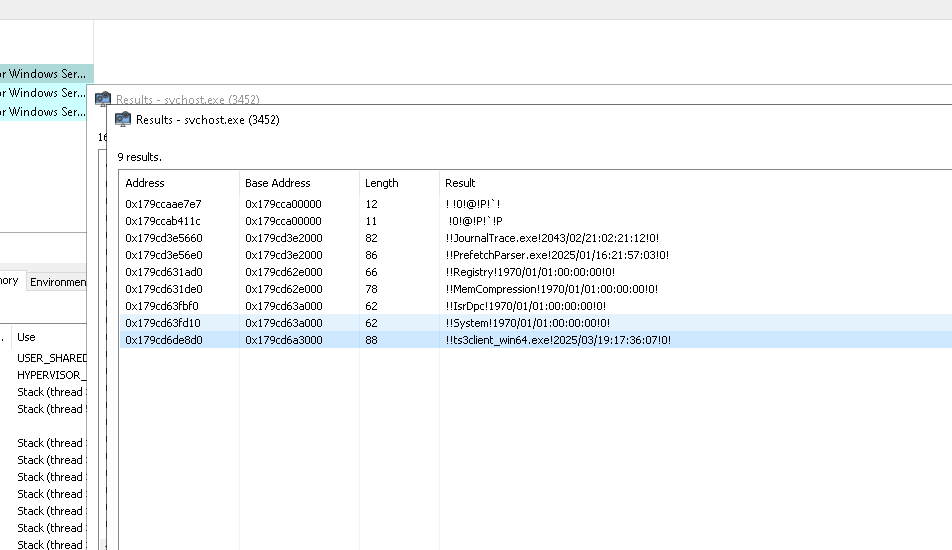
The DPS timestamp of 2024-09-25 08:40:13 is written by the Windows Program Compatibility Assistant service at first execution and cannot be cleared by the same routines that wipe Prefetch or browser history.
Behavioral indicators
TeamSpeak 3 masquerade
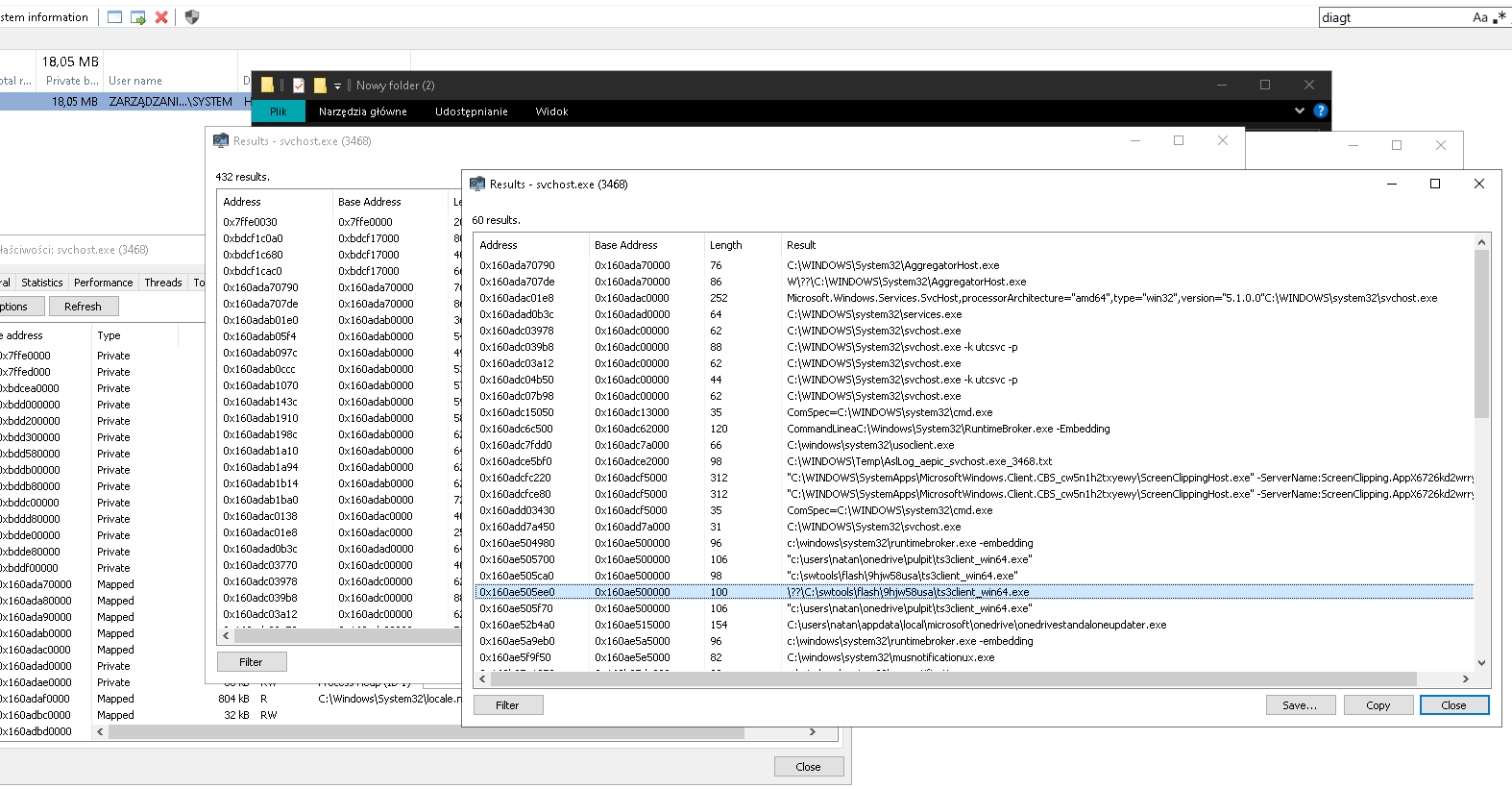
Skript.gg names its loader ts3client_win64.exe to impersonate the TeamSpeak 3 voice client, the same approach used by TZ Project with firefox.exe. A legitimate TeamSpeak 3 binary runs from C:\Program Files\TeamSpeak 3 Client\. Any ts3client_win64.exe outside that path is the Skript.gg loader. The masquerade is immediately exposed by checking the full executable path in Task Manager or System Informer. Some variants also use the name of USBDeview, a legitimate USB enumeration utility, in place of the TS3 filename.
Browser artifact, skript.gg visit
The browser history check for skript.gg is specifically looking for visits to the cheat's public-facing pages, not the member dashboard (which requires login). A visit to skript.gg in history without a corresponding dashboard session is suspicious but not conclusive on its own. A download from skript.gg in the browser's download history is stronger evidence of acquisition.
DiagTrack artifact
The Windows Diagnostics Tracking service (DiagTrack) logs carry references to cheat activity. Check System Informer under Services for DiagTrack entries related to skript.gg. These entries are partial, they may not persist across reboots depending on the DiagTrack log rotation, but when present they provide an additional corroborating signal.
Disk Drill, carved deleted files
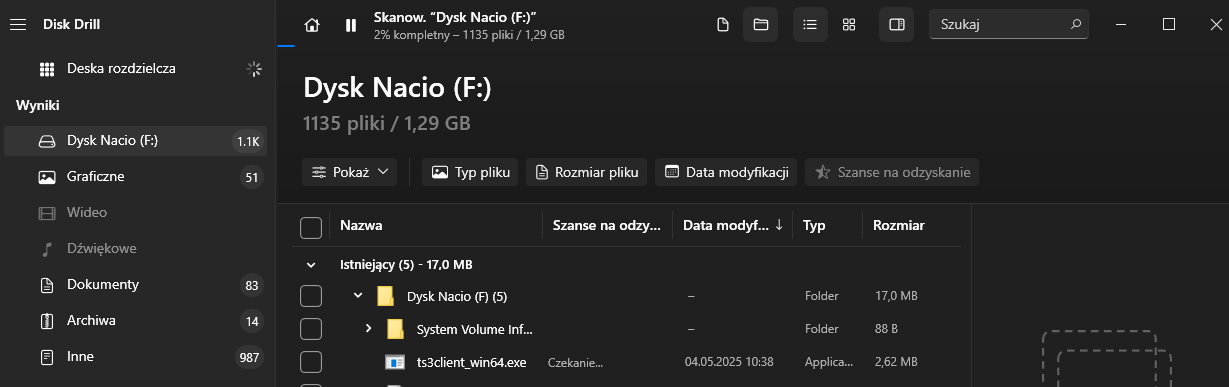
Deleted cheat files can be recovered from unallocated disk space using Disk Drill, confirming prior installation even after manual deletion. This technique provides a forensic record when the user has attempted to clean up all visible file artifacts. Recovered files from unallocated space are strong evidence of past installation because they persist until the relevant sectors are overwritten by new data.
Memory artifacts
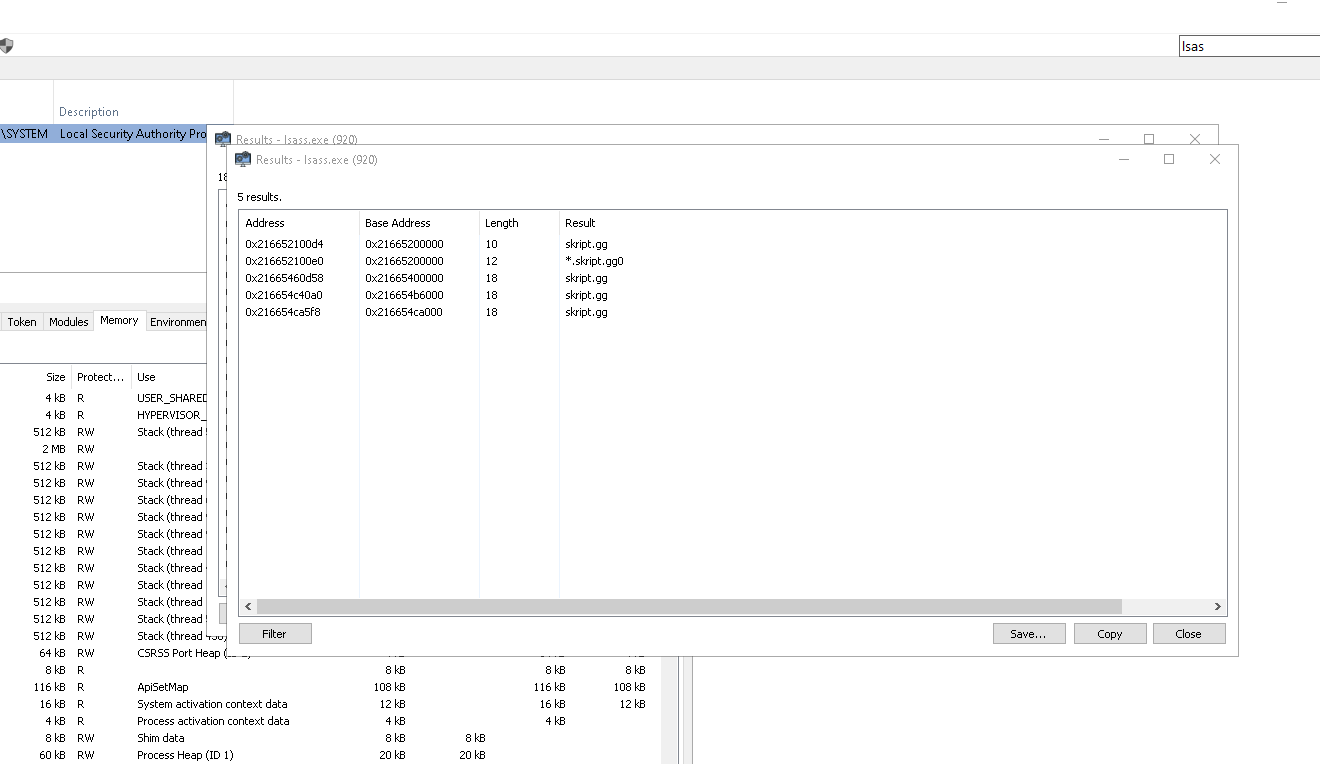
During an active Skript.gg session, the C2 domain skript.gg is present in LSASS process memory and in the system DNS cache. The DNS entry persists for the duration of the TTL set by the authoritative server.
lsass.exe memory
The C2 domain string appears in lsass.exe process memory as a residual artifact from injection or inter-process communication performed by the loader. A string scan in System Informer targeting skript.gg in the LSASS working set confirms active cheat operation.
File artifacts
Beyond memory-resident indicators, Skript.gg leaves persistent file-system artifacts that survive session cleanup.
Explorer DLL artifact
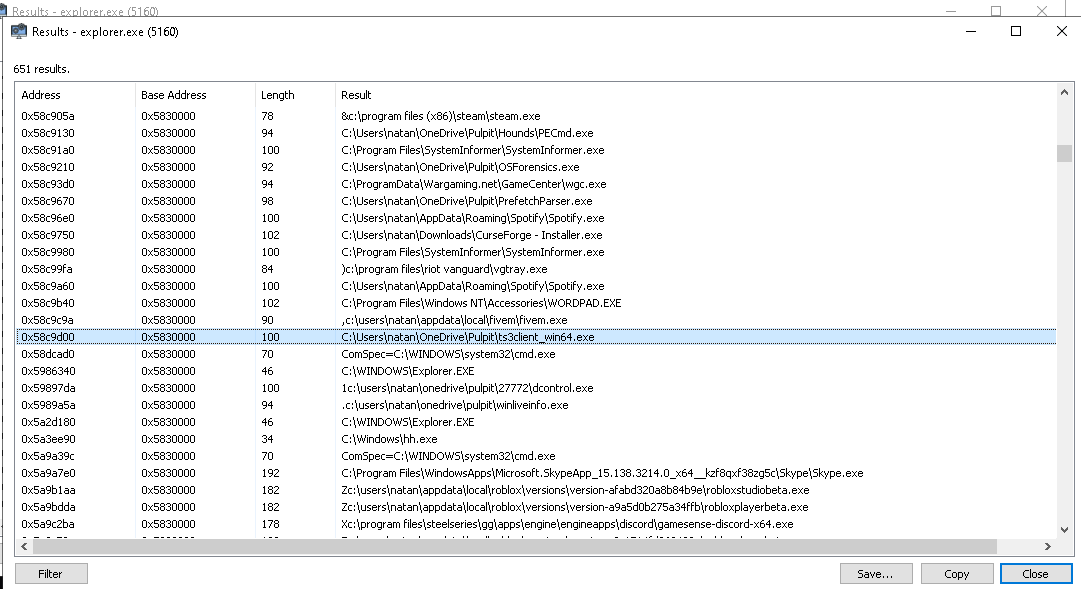
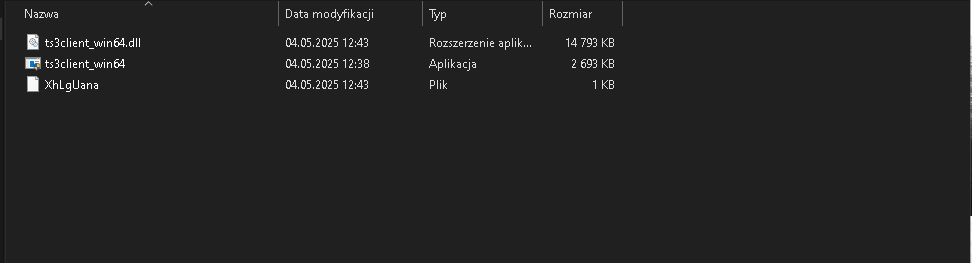
A DLL artifact associated with the ts3client_win64 loader is observable through Explorer. This artifact persists in the file system and can be located by searching for ts3client_win64 in an Explorer window or via Everything. The DLL is dropped as ts3client_win64.dll alongside the loader.
Journal Trace
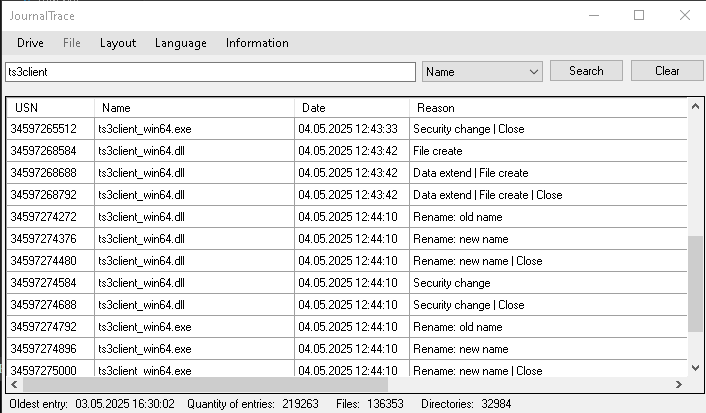
A USN Journal trace for ts3client_win64 or skript records the file-creation events for the loader and its DLL, giving a timestamped record of installation even after the files themselves are deleted.
Skript.gg loader files
The on-disk layout of the Skript.gg loader and its supporting files, as recovered during analysis.
Screenshare check guide
Work through these steps in order. Step 1 is the fastest and will immediately expose the TS3 masquerade. Steps 2–8 cover memory, DiagTrack, file recovery, and cleanup-resistant persistence.
ts3client_win64.exe path check
- Open Task Manager or System Informer and look for any running instance of ts3client_win64.exe.
- If found, check the full executable path. A legitimate TeamSpeak 3 process runs from C:\Program Files\TeamSpeak 3 Client\ts3client_win64.exe. Any other path, particularly user-writable locations, is the Skript.gg loader.
DNS cache
- Run ipconfig /displaydns or check System Informer's DNS section.
- Search for skript.gg. A cache hit confirms an outbound connection was made during the current or a recent session.
lsass.exe memory scan
- If the cheat is currently running, perform a string scan in System Informer for skript.gg.
- Hits in lsass.exe confirm active C2 communication and injection into the LSASS working set.
Browser history, skript.gg
- Check browser history for visits to skript.gg. Focus on the download history, a direct download from skript.gg is stronger evidence than a page visit alone.
- A visit to the public-facing site without a dashboard session is suspicious but not conclusive on its own; combine with other indicators.
DiagTrack entries
- Open System Informer and navigate to Services.
- Check DiagTrack entries for references to Skript.gg activity. These are partial indicators, combine with DNS and memory evidence for a complete picture.
Explorer and DLL artifact
- Search in Explorer or Everything for ts3client_win64 to locate the DLL artifact left by the loader.
- A DLL with this name outside the legitimate TeamSpeak 3 Client installation directory is a direct indicator of Skript.gg presence.
Journal Trace
- Run a Journal Trace search for ts3client_win64 or skript.
- Journal entries record file creation events for the loader binary and associated files, providing a timestamped record of initial installation.
Disk Drill, deleted file recovery
- If the user claims to have deleted all cheat files, run Disk Drill on the system drive and search for ts3client_win64 or skript in carved files from unallocated space.
- Recovered files confirm prior installation even after manual deletion, as long as the relevant sectors have not yet been overwritten.
Detection summary
Artifact                          Survives cleanup?   Check location
──────────────────────────────────────────────────────────────────────────
PcaSVC / DPS timestamp            Yes                 AppCompat / DPS log
Prefetch (ts3client_win64 path)   Usually             C:\Windows\Prefetch
DNS cache (skript.gg)             Session-length      ipconfig /displaydns
C2 strings in lsass.exe           Only while running  Memory string scan
DiagTrack entries                 Partial             System Informer > Services
Browser history (skript.gg)       Partial             Browser + Informer
ts3client_win64 DLL artifact      Yes                 Explorer / file system
Deleted files (Disk Drill)        Recoverable         Unallocated disk space
The most immediately actionable indicators are the ts3client_win64.exe path mismatch in the process list or Prefetch record, the DLL artifact in the file system and the DPS timestamp which cannot be cleared without registry editing. The Disk Drill recovery technique provides a forensic backstop when a user has attempted to delete all visible artifacts.
Defensive material
All indicators and methodology documented here are published for server administrators, DFIR practitioners and anti-cheat researchers. This material describes detection techniques only. For vulnerability disclosures or to contribute to the research corpus, contact security@clubhouseac.shop.